.webp)
Most law firms do not think about IT support until something breaks. In legal practice, a broken system is not just an inconvenience. It can mean a missed court filing, a breached client file, or a malpractice exposure that no insurance policy will fully cover.
Technology demands on legal practices have grown sharply. Remote work, cloud-based case management, e-discovery tools, digital client portals, and AI-assisted legal research have all become part of the daily workflow. Managing all of that with reactive, break-fix IT support is no longer a viable strategy for any firm serious about protecting billable hours and client confidentiality.
This guide breaks down what IT support for law firms actually covers, why it is operationally and ethically non-negotiable in 2026, and what to evaluate before choosing a provider or model.
Key Takeaways
- Law firms face IT risks that generic, break-fix providers are not equipped to address, including ABA compliance obligations and legal software stack requirements.
- ABA Model Rule 1.6 makes cybersecurity an ethics obligation. A data breach is not only a business problem; it can result in bar disciplinary action.
- Managed legal IT typically costs $150 to $250 per user per month, which is less than the cost of two hours of firm-wide downtime at most billing rates. (Source: WheelHouse IT)
- The right IT setup protects billable hours, client confidentiality, and malpractice exposure simultaneously. These are not separate concerns.
What Is IT Support for Law Firms?
IT support for law firms refers to the comprehensive management and maintenance of both the hardware and software systems a legal practice depends on to operate. That includes everything from the devices attorneys use daily to the cloud infrastructure that stores client files and case records.
In a legal context, IT support is a specialization, not a commodity. A provider that works well for a dental group or a retail chain may be completely inadequate for a law firm managing sensitive discovery materials, privileged communications, and confidential client data. The technical requirements are different, and so are the ethical and compliance obligations that come with them.
Law firms typically access IT support through one of two models. Large firms with 100 or more staff may maintain an in-house IT department. Smaller and mid-sized firms, which make up the majority of U.S. legal practices, almost always work with a managed service provider, or MSP, that delivers legal-specific IT services on a monthly flat-fee basis.
What Does Legal IT Support Actually Cover?
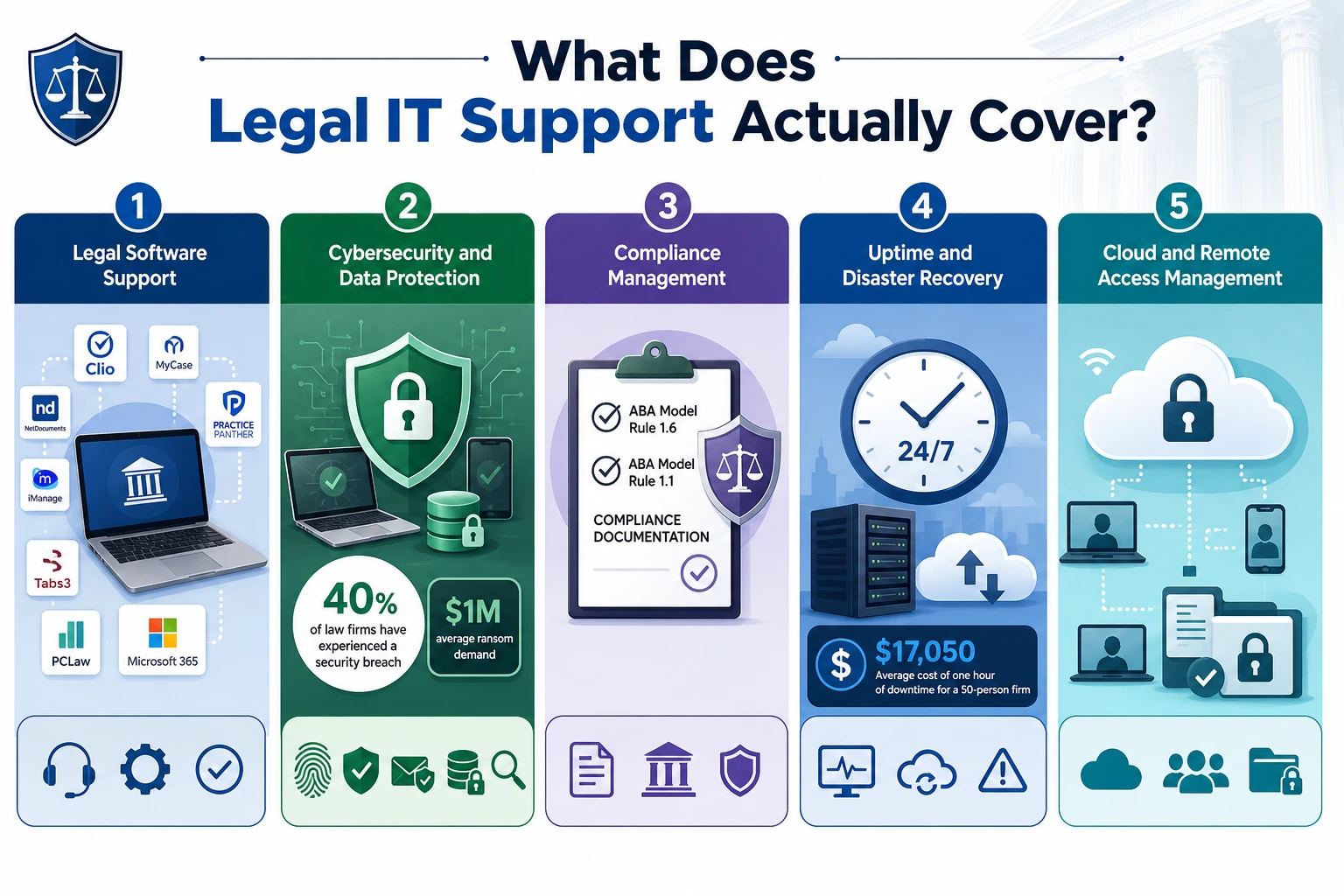
Legal IT support is more than a help desk. A qualified provider covers five core areas, each of which carries direct consequences for a firm's operations, reputation, and compliance standing.
Legal Software Support
A typical law firm runs a specific and interconnected software stack. This includes a practice management platform such as Clio, MyCase, or PracticePanther; a document management system such as NetDocuments or iManage; a billing application such as Tabs3 or PCLaw; and
Microsoft 365 for communication and productivity. When something breaks inside one of these platforms at 9 PM the night before a filing deadline, the answer cannot be to open a vendor ticket and wait. Legal-specific IT providers resolve these issues directly, without routing attorneys to third-party queues.
Cybersecurity and Data Protection
Law firms hold some of the most sensitive data in existence: attorney-client communications, financial records, litigation strategies, and personal client information. That makes them a high-value target.
According to a 2024 study, 40% of law firms have experienced a security breach, and the average ransom demand for legal organizations has reached $1 million. A managed provider builds layered security: multi-factor authentication, endpoint detection and response, encrypted backups, advanced email filtering, and regular security testing.
Compliance Management
ABA Model Rule 1.6 is an ethics rule, not a best-practice recommendation. Bar associations in multiple states have issued formal guidance stating that attorneys who fail to implement reasonable technical safeguards for client data may face disciplinary action.
A qualified legal IT provider produces compliance documentation, including ABA Rules 1.1 and 1.6 posture reports, that can satisfy a bar inquiry or a malpractice insurer audit. Generalist providers do not.
Uptime and Disaster Recovery
In most industries, downtime is an inconvenience. In a law firm, downtime means lost billable hours, missed filings, and frustrated clients. A single hour of firm-wide downtime costs an estimated $17,050 for a 50-person firm.
Courts consistently reject technology failure as grounds for deadline extensions, and missed filings remain the leading cause of legal malpractice claims. Proactive monitoring catches and resolves most issues before anyone in the office notices.
Cloud and Remote Access Management
Secure cloud access, remote workforce support, and document management in hybrid environments are no longer optional features.
Firms that rely on distributed teams, remote case managers, or hybrid staffing arrangements depend on their IT infrastructure to keep sensitive case files accessible only to authorized staff, wherever they are working.
Why Law Firms Cannot Rely on Generic IT Support
The most common mistake small and mid-sized firms make is assuming that any competent IT provider can serve a law firm. The reality is the opposite.
When an IT provider does not understand the legal software stack, the result is workarounds, slowdowns, and security vulnerabilities the firm did not know existed.
The break-fix model also creates a fundamental conflict of interest. A provider operating on break-fix billing only generates revenue when your firm is in crisis. Managed IT flips that model: the provider succeeds when your systems run without incident, which aligns incentives with the firm's interests.
There is also a dimension unique to law: ethics exposure. In most industries, a cybersecurity failure is a business problem. For a law firm, it can become a bar complaint, a malpractice claim, and a reputational crisis simultaneously. No amount of retroactive IT work undoes a privileged communication that was exposed.
How to Evaluate IT Support for Your Law Firm
Not all managed IT providers are equipped for the legal environment. These are the criteria that separate adequate providers from genuinely qualified ones.
Legal Software Expertise
Ask specifically whether the provider can support Clio, iManage, NetDocuments, and your billing platform directly, not through a vendor handoff. The difference in response quality under pressure is what separates legal-specialist providers from generalists.
Compliance Documentation
A qualified provider should produce ABA-aligned incident response documentation as a standard deliverable. Ask whether they can provide written documentation that satisfies Rules 1.1 and 1.6 and whether that documentation is defensible in a bar inquiry.
Response Time SLAs
A service-level agreement for critical issues should not read like a general business IT contract. Ask specifically: what is the guaranteed response time for a system-down event at 9 PM the night before a court deadline? If the answer is vague, the provider is not built for legal.
Pricing Model
Look for flat-fee per-user pricing with no surprise overage billing. Managed legal IT typically runs $150 to $250 per user per month. For a 10-attorney firm, that is $1,500 to $2,500 monthly. That is less than the cost of a single afternoon of firm-wide downtime at any competitive billing rate.
Contract Terms
Established providers in the legal IT space increasingly offer month-to-month arrangements rather than annual lock-in contracts. A provider confident in their service delivery does not need to trap clients in long-term agreements.
For solo practitioners through mid-sized firms, managed IT is the practical choice. It delivers enterprise-grade security and compliance documentation at a predictable monthly cost, without the overhead of recruiting, onboarding, and retaining a full in-house IT team.
Some larger firms use a hybrid approach: a part-time internal IT coordinator handles day-to-day requests while a specialist MSP covers security, compliance, and legal software support.
How Remote Staffing Complements Your IT Investment
Investing in managed IT creates a secure, high-performance digital environment for your firm. But technology infrastructure alone does not close the operational gap. The Clio Legal Trends Report found that attorneys spend just 37% of their workday on billable tasks. The rest goes to administrative work: case updates, scheduling, document organization, and client follow-up.
Firms that pair reliable managed IT with trained, full-time remote legal support staff are solving both sides of that problem at once. The IT infrastructure keeps case management platforms running securely. The remote support staff, already fluent in tools like Clio, Filevine, and MyCase, handles the administrative volume that would otherwise fall on your attorneys.
At Remote Case Manager, our legal support professionals integrate directly into your firm's existing tech stack from day one. They are attorney-trained, bilingual in English and Spanish, and ready to handle case management, client communication, intake, and deadline tracking without onboarding delays.
Firms using Remote Case Manager report cutting overhead costs by up to 70% compared to expanding an in-house team. Visit our trained remote case managers page to learn more, explore virtual staffing solutions built for legal teams, or review transparent flat-rate pricing that makes scaling your support staff predictable.
Common IT Mistakes Law Firms Make in 2026
Even firms that invest in IT support make avoidable errors. These are the most common ones.
Staying on Break-Fix Past Five Attorneys
Break-fix IT made sense for a solo practitioner sharing a server and two desktops. It does not scale to a five-attorney or larger firm with live client portals, cloud-based case management, and remote staff accessing files from multiple locations.
Using Consumer-Grade Cloud Storage for Client Files
Personal Google Drive accounts and standard Dropbox plans are not configured for legal data compliance. They lack the access controls, encryption standards, and audit trail capabilities that ABA guidance requires. Moving client files to a consumer cloud product does not count as a compliant cloud migration.
No Documented Incident Response Plan
Most small firms have no written plan for what happens when a system is compromised. That gap becomes visible immediately when a bar inquiry or a malpractice insurer asks for documentation. A qualified IT provider produces this as a standard deliverable.
Skipping Multi-Factor Authentication on Case Management Systems
Outdated software, weak passwords, and missing multi-factor authentication are the gaps attackers exploit most consistently at small law firms. These are the vulnerabilities that lead to breaches and ransomware events. MFA on every case management platform is a non-negotiable baseline, not an advanced security measure.
Frequently Asked Questions
What does IT support for law firms include?
Legal IT covers cybersecurity, legal software management, cloud access, compliance documentation, help desk support, and disaster recovery planning.
How much does IT support for a law firm cost?
Most firms pay $150-$250 per user monthly for managed IT. For a 10-attorney firm, that is roughly $1,500-$2,500 per month.
Do small law firms need managed IT?
Yes. Small firms are frequent ransomware targets. A managed provider delivers enterprise-grade security at a flat monthly cost with no in-house hiring overhead.
What is the ABA rule on law firm IT security?
ABA Model Rule 1.6 requires reasonable technical safeguards for client data. Non-compliance can trigger disciplinary action, not just a security incident.
What is the difference between general IT and legal IT?
Legal IT providers understand practice management platforms, ABA compliance requirements, and attorney-client privilege. Generalist providers typically do not.
Build Your Firm on a Foundation That Does Not Fail
IT support for law firms is not a technology purchase. It is a risk management decision that sits alongside malpractice coverage and client confidentiality protocols as a non-negotiable operational baseline.
The firms getting this right in 2026 treat their IT infrastructure with the same seriousness they apply to case strategy: proactively, with documented processes, and with providers who understand the specific obligations and consequences of working in the legal industry.
Whether you are evaluating your first managed IT provider or reconsidering an arrangement that has not kept pace with your firm's growth, the criteria are consistent. Look for legal software expertise, a proactive compliance posture, defined response SLAs, and transparent flat-rate pricing.
And if your firm is also carrying administrative overhead that keeps your attorneys out of the billable work they were hired to do, explore what a full-time remote case manager can do for your operations. The infrastructure and the support staff work better together.













.webp)


%20(1).webp)






















%20(2)%20(2).avif)
.avif)